
Built for the full dive operation
One system from the first sale to the last dive of the day.
Run retail, rentals, service, training, charters, travel, waivers, and customer communication without stitching together separate tools.
- Point of Sale & Inventory
- Supplier Catalogs: Over 40 Vendors
- Rentals & Gear Service
- Activities, Classes & Travel
- Waivers, Weather & Manifests
- Seat Assignments
- Booking Options
- Book Groups
- Non-Diving Group Leaders
- Assign Staff as Dive Guides or Buddies
- Buddy Solo Divers or Group Guests with One Another

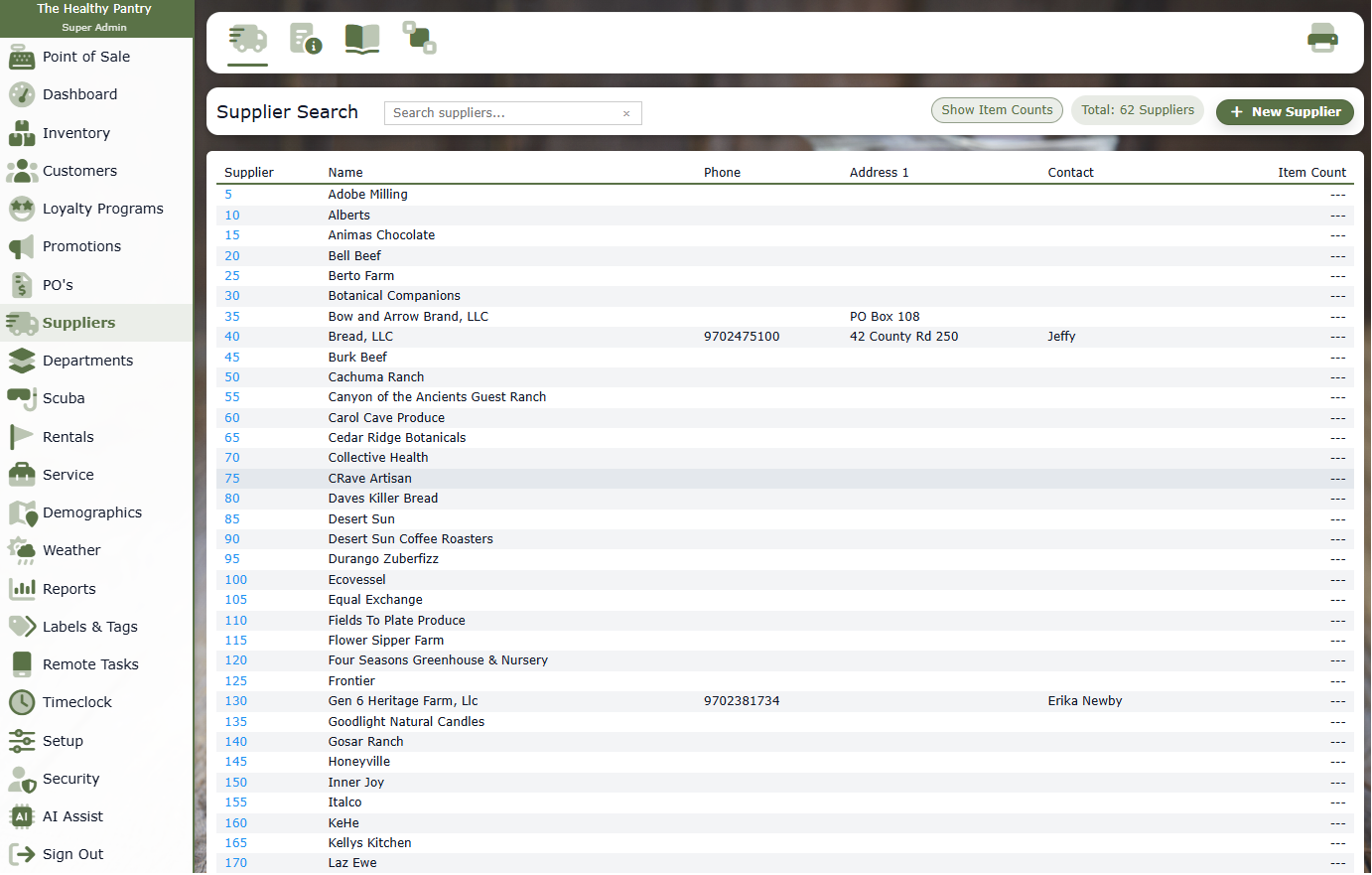
Supplier catalogs for dive shops
Over 40 vendors. 35,000 product images. Every available price point.
Give your dive shop a head start with supplier product data and images, connected to inventory, purchasing, and online selling.
- Explore catalogs from over 40 vendors and a library of 35,000 product images.
- Work with every available supplier price point, including cost, MSRP, and MAP where supplied.
- Compare supplier pricing and carry catalog data into your inventory and purchasing workflow.
The whole dive day, connected
Give every part of the shop the same source of truth.
Diverse Retail connects the customer-facing moments with the behind-the-scenes work, so the counter, service bench, classroom, and boat crew are not operating in separate systems.
From booking to back on the shelf
A cleaner handoff at every stage.
- 1Discover & book
Customers choose an activity, class, trip, or charter.
- 2Prepare
Staff confirm waivers, balances, gear needs, and assignments.
- 3Check in
Manifests, rentals, notes, and customer details are ready.
- 4Run the dive
Teams stay connected to the schedule and daily conditions.
- 5Return & follow up
Gear, service needs, payments, and communication close the loop.
Dive workflow explorer
See how each part of the operation works.
Choose a workflow to explore the details and working screens your team can use every day.
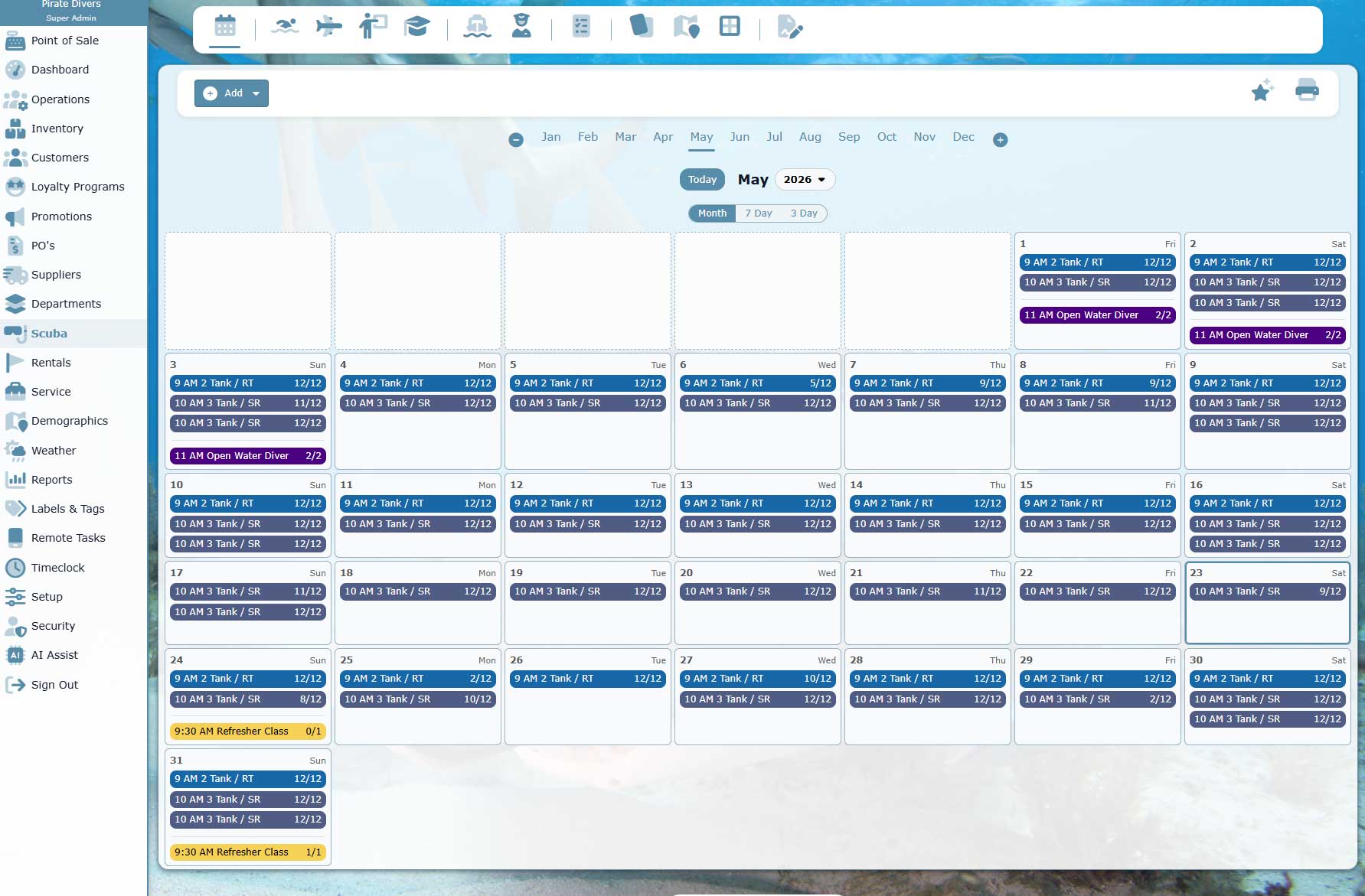
Staff Calendar and Shop Coverage
Coordinate instructors, counter staff, service staff, boat crew, classes, charters, and internal tasks from a shared operating calendar.
- Keep shop coverage, classes, boat schedules, and activities visible together.
- Limit staff access by role so outside instructors or boat staff see only what they need.
- Connect staff assignments back to bookings, manifests, service, and customer activity.
Customer-facing booking and shopping
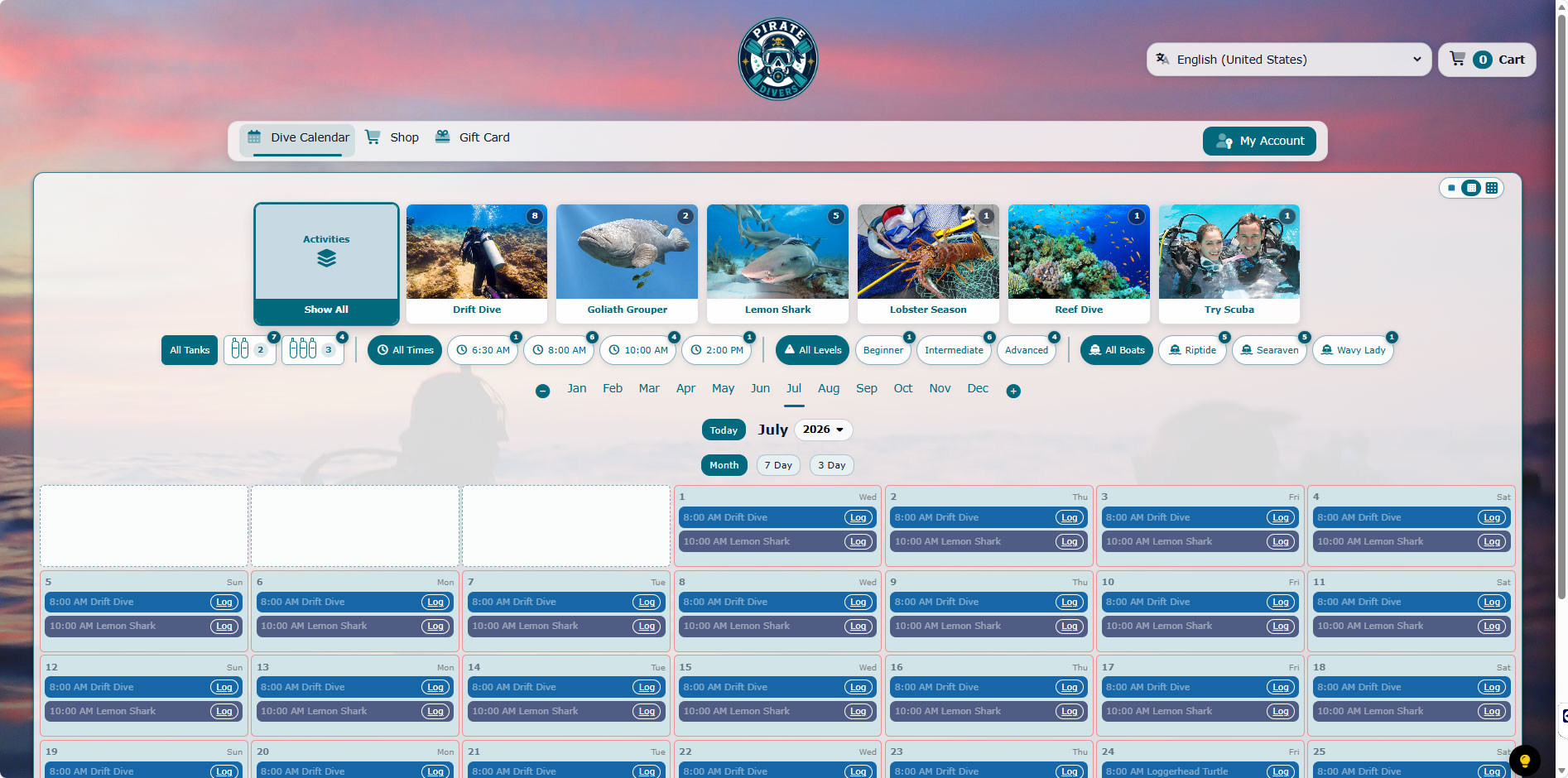
An Exceptionally Flexible Public Calendar
Turn your live activity schedule into a polished, self-service booking experience that stays connected to your dive shop operations and eCommerce.
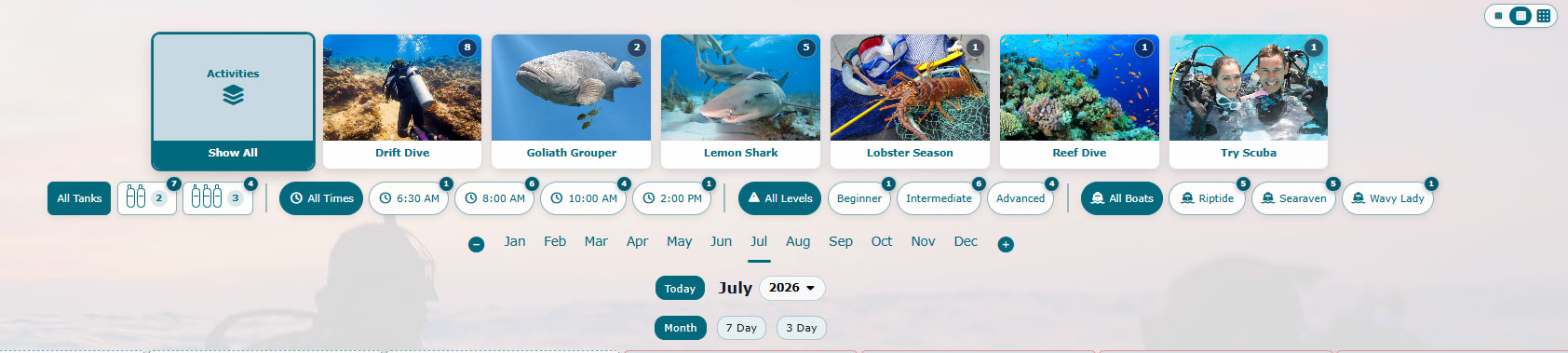
- Let customers narrow the calendar by tank count, boat, calendar category, departure time, and difficulty level.
- Availability counts are interactive: click a count to see the individual matching days or open a calendar of availability.
- Browse visually by activity, search for a specific date, or move between month, 7-day, and 3-day calendar views.
- Offer seat selection when an activity or boat uses assigned seating.
- Optionally allow the first customer who books an activity to choose the dive site.
- Book individuals, families, and groups while keeping every reservation connected to the correct activity and manifest.
- Customers can sign in to review purchase and tour history, or continue through a convenient guest checkout.
- Keep activities, retail shopping, gift cards, account access, and the cart together in one branded public experience.
Gear Service and Work Orders
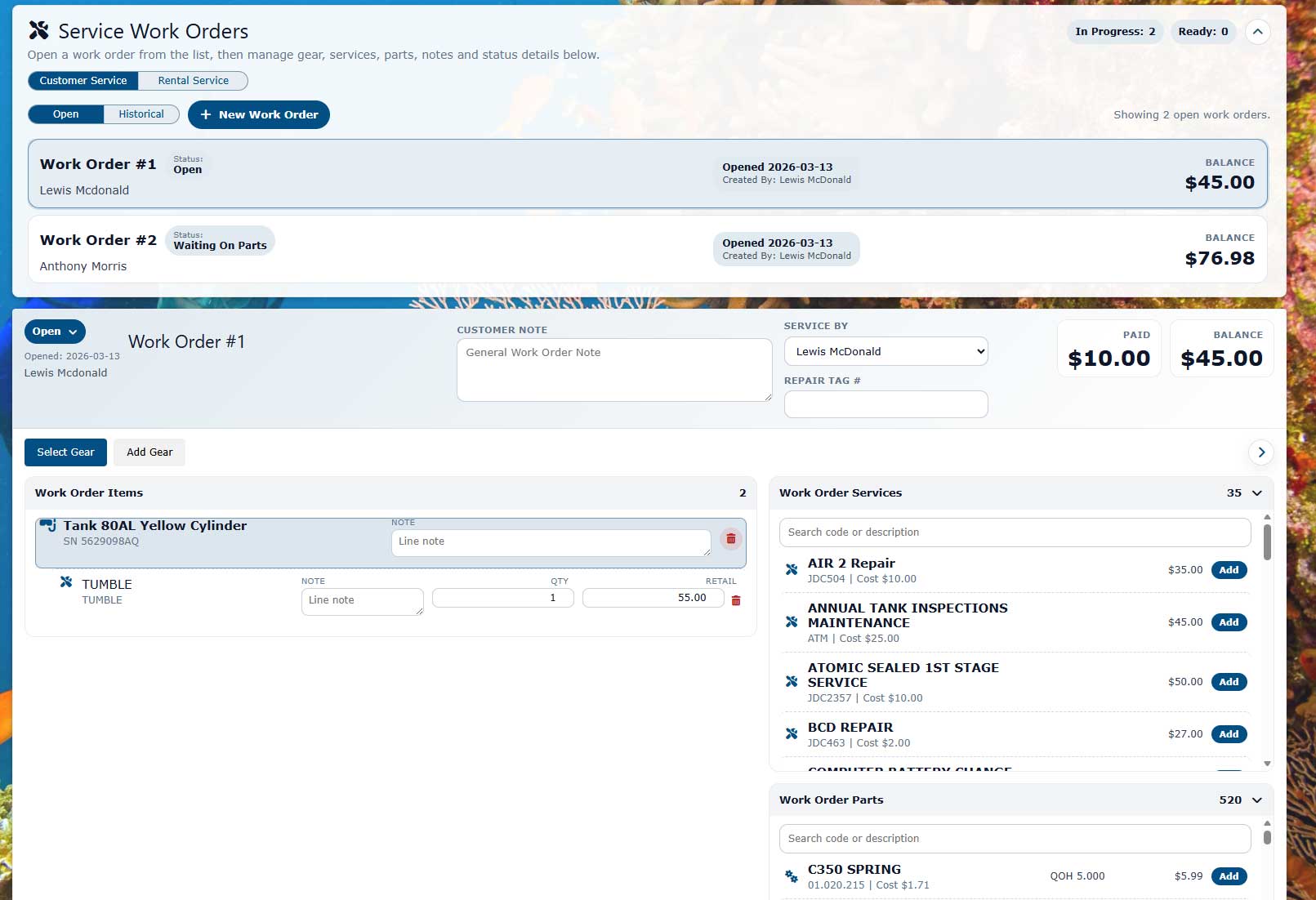
Start service jobs from the POS, attach customer gear, repair notes, parts, deposits, balances, and staff assignments, then track the job through pickup.
- Manage tanks, regulators, BCs, computers, wetsuits, and general gear service.
- Support off-site technicians with limited access to assigned service orders.
- Keep service revenue, parts, and customer history tied to the same account.
Air Fills, Nitrox, and Prepaid Cards
Sell fills, nitrox, prepaid dive cards, fill cards, and other buy-ahead programs from checkout without losing usage history.
- Use Pre-Pay programs for dive cards, fill cards, and other buy-ahead offers.
- Create prepaid cards for fills, dives, classes, service, or store-defined programs.
- Track redemptions against the customer profile.
- Use discount-friendly prepaid offers without manual counter math.
Rental Gear Control
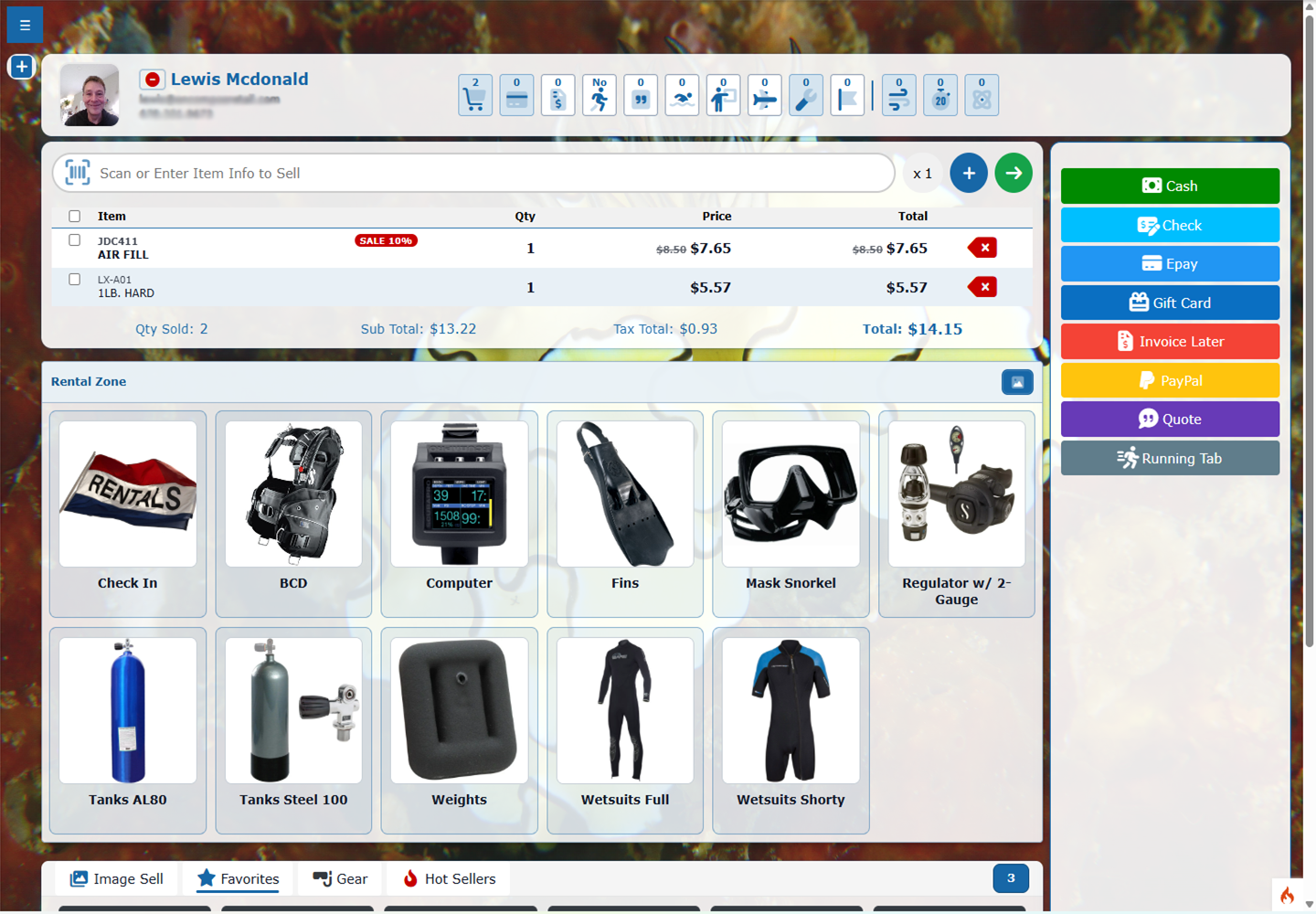
Handle rental categories, gear assignment, check-out, check-in, usage counts, service linkage, and rental visibility from the same workflow.
- Rental categories, rental items, serial tracking, usage counts, and service linkage stay connected to checkout and customer activity.
- Use image or text rental modes depending on counter preference.
- Track serialized rental gear and flag items that need service attention.
- Keep rental activity tied to customers, trips, classes, and invoices.
- Rent by list or barcode scan so staff can pick gear from the rental list or scan the item barcode at the counter.
- Know what is out, due, and past due at a glance.
Activity Calendar and Manifests
Trips, local dives, charters, pool sessions, and shop events live beside POS so counter staff can see the schedule without jumping into a separate system.
- Use month, 7-day, and 3-day calendar views with manifest links for each scheduled activity.
- See reservations, seats, roster notes, customer balances, and waiver status close to the sale.
- Support solo bookings, families, friend groups, and other dive shop managed group reservations.
- Quick templates reduce setup time for repeat activities. Create an HTML description template, default pricing, and a preassigned calendar category, then apply the template when building a new activity.
- Build recurrences for activities that repeat on a schedule, such as daily boat dives, weekend dives, monthly pool sessions, recurring classes, or seasonal trips, so staff can generate the activity series without rebuilding each date by hand.
- For dive boat activities, set up boats in the system and assign them to events, including seat assignment setup so customers can choose a seat when booking.
Booking options
Offer Booking Options
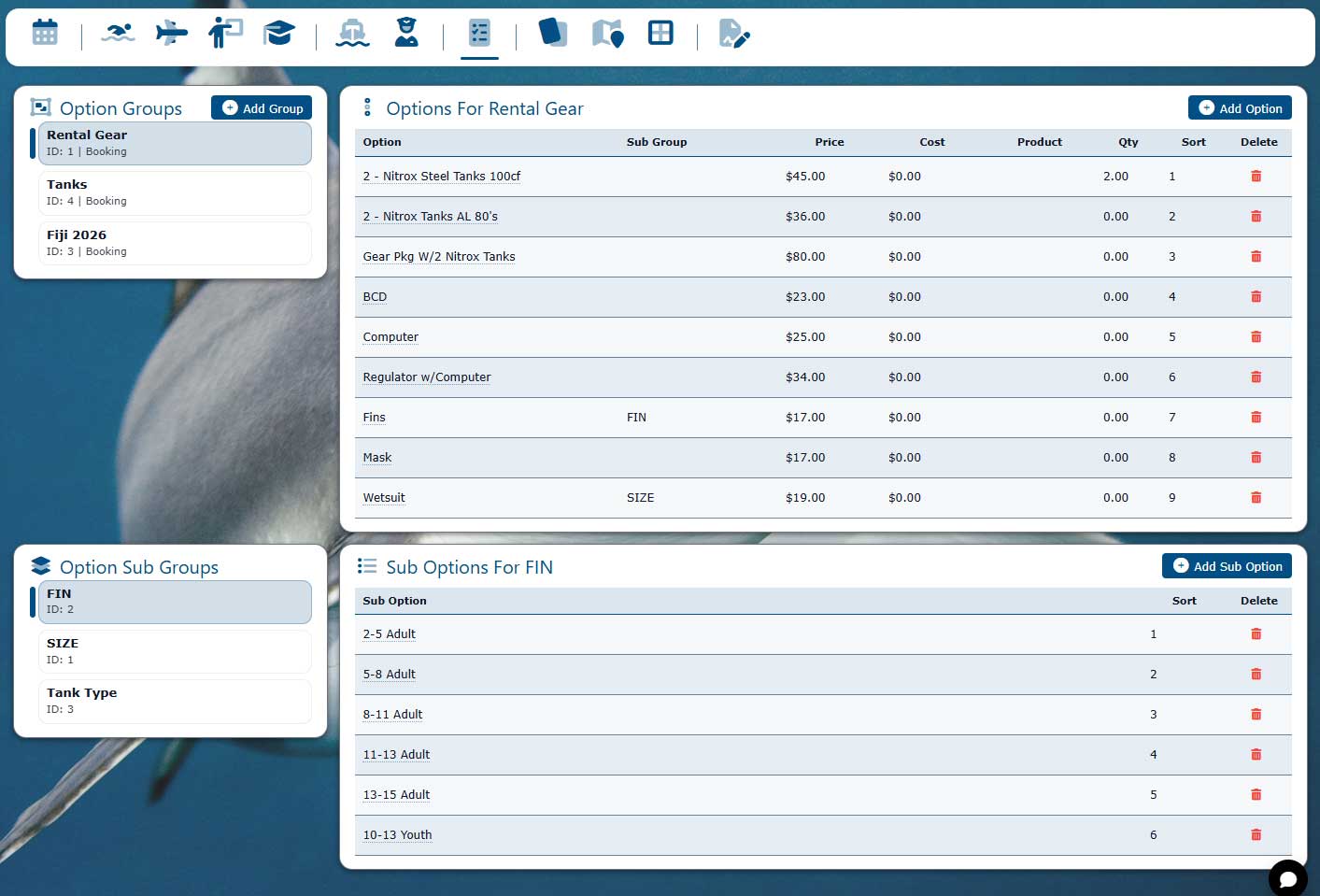
Add sub-options to an activity so customers can choose required details during booking, such as a BCD and size, rental add-ons, passenger choices, certification options, or other shop-defined selections.
- Let customer selections adjust the activity price automatically.
- Collect operational details before the customer arrives.
- Keep options tied to the booking, manifest, balance, and customer record.
Focused dive-day operations
Daily Manifests
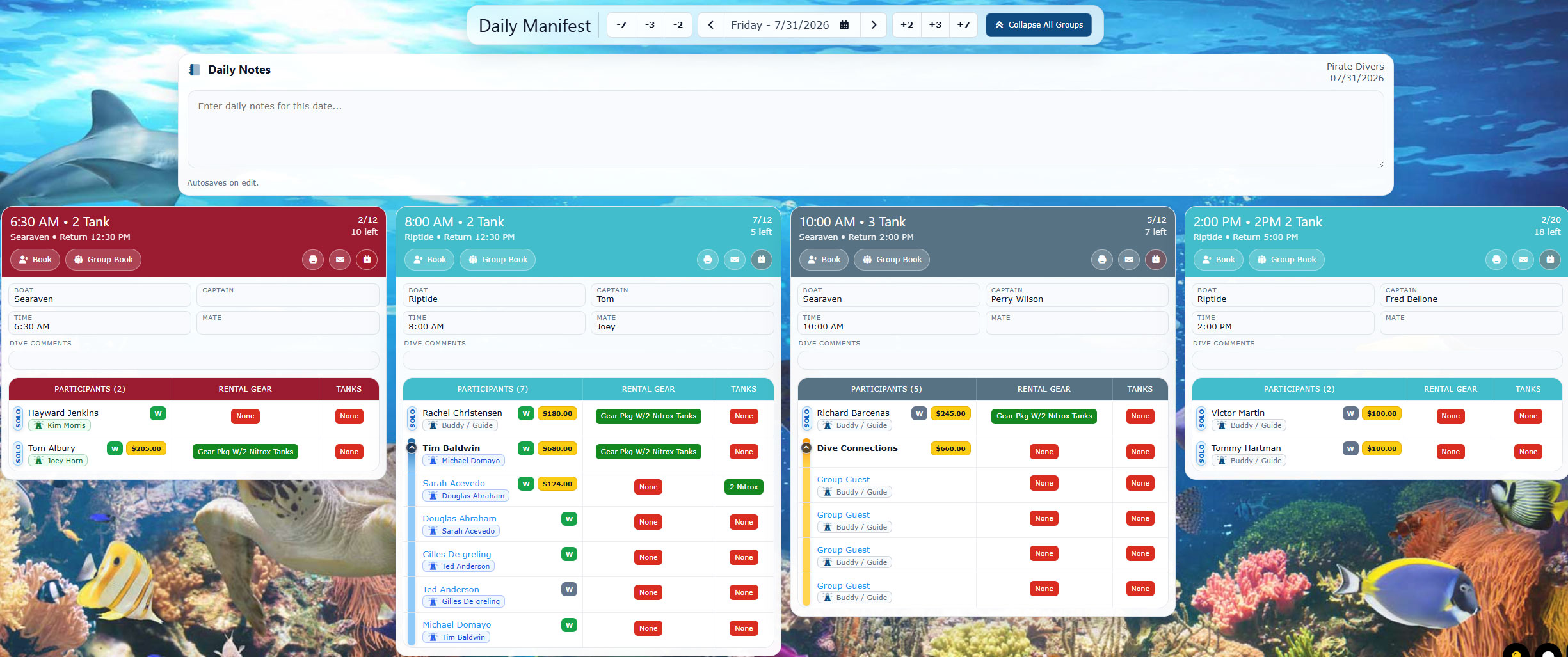
Bring every activity for a selected day into one focused operational view for check-in, preparation, staff coordination, and departure.
- Review participant counts, remaining capacity, waiver status, outstanding balances, rental gear, tanks, boats, staff, and departure times together.
- Add shared daily notes and move quickly to earlier or later manifest dates without returning to the calendar.
- Clearly identify solo divers and groups, collapse group guests, distinguish diving and non-diving leaders, and review buddy or guide pairings.
- Print an individual activity manifest or send participant updates and cancellation notices directly from the day’s activity cards.
- Carry the selected calendar color legend into the manifest so activities remain easy to identify throughout the workflow.
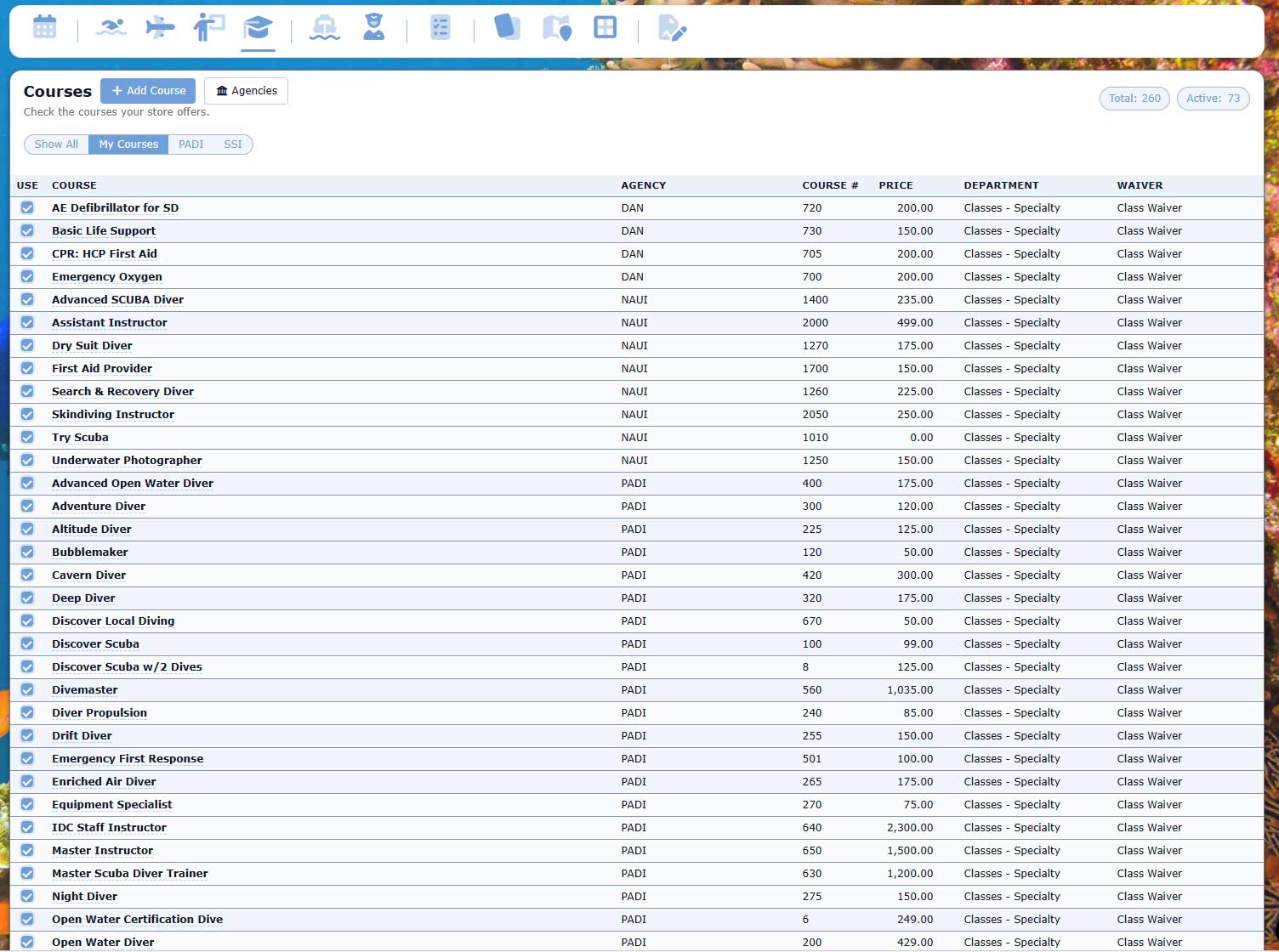
Classes and Training Programs
Manage open water classes, continuing education, specialty training, pool sessions, classroom time, and instructor assignments from the same operational calendar.
- Track students, class rosters, instructor assignments, prerequisites, and training dates.
- Keep waivers, balances, customer records, and communication tied to each student.
- Separate training schedules from trips and travel while still keeping the full customer history connected.
- Use class visibility at the counter so staff can answer schedule and balance questions quickly.
Travel and Group Trips
Plan store travel, destination trips, group outings, and multi-day events with booking details connected to customers, deposits, balances, and manifests.
- Organize travel options separately from everyday activities and training classes.
- Track group leaders, non-diving companions, deposits, open balances, and trip communication.
- Keep manifests, waivers, emergency contacts, and customer notes available for staff.
- Connect trip revenue and customer activity back to reporting without duplicate entry.
Serialized Gear Tracking
Track serialized gear across retail sales, rental fleets, customer-owned gear, and service records.
- Keep serial numbers attached to tanks, computers, regulators, BCs, and service items.
- Review ownership, service activity, and sales history from the customer profile.
- Support warranty, inspection, and service follow-up workflows.
Running Tabs for Dive Days
Keep open tabs for customers, groups, boats, classes, or ongoing counter activity, then settle them when the timing is right.
- Group related charges without closing the sale immediately.
- Support active dive days where customers add fills, rentals, snacks, or gear.
- Convert the tab to tender when the customer is ready to settle.
Open Invoices and Balances
Create and manage invoices for training, trips, gear packages, service balances, group activity, and customer account charges.
- Keep unpaid balances visible for staff.
- Connect invoice history to the customer record.
- Use invoices alongside deposits, payments, and POS tender workflows.
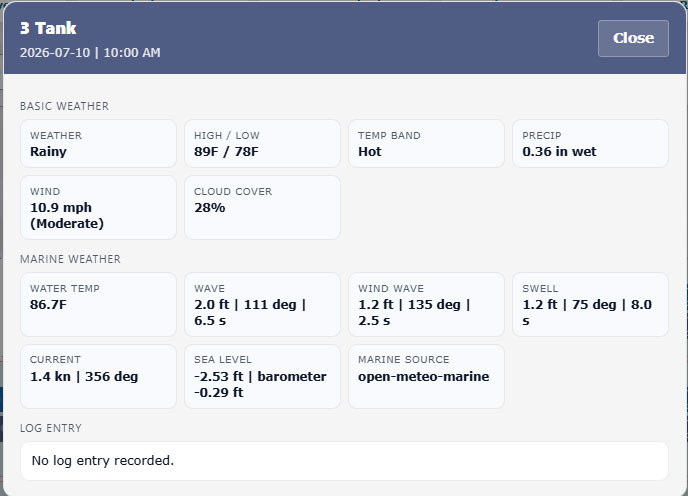
Marine Weather and Dive-Day Visibility
Bring marine weather context into daily operations so staff can plan classes, trips, charters, and staffing around real conditions.
- Use Marine and Weather visibility with reporting context for daily shop performance.
- Use Open-Meteo weather and marine data integration.
- Keep weather context close to trip, class, and reporting workflows.
- Marine and weather conditions are available for shoppers to view in the dive logs for completed activities.
- Support practical planning without leaving the system.
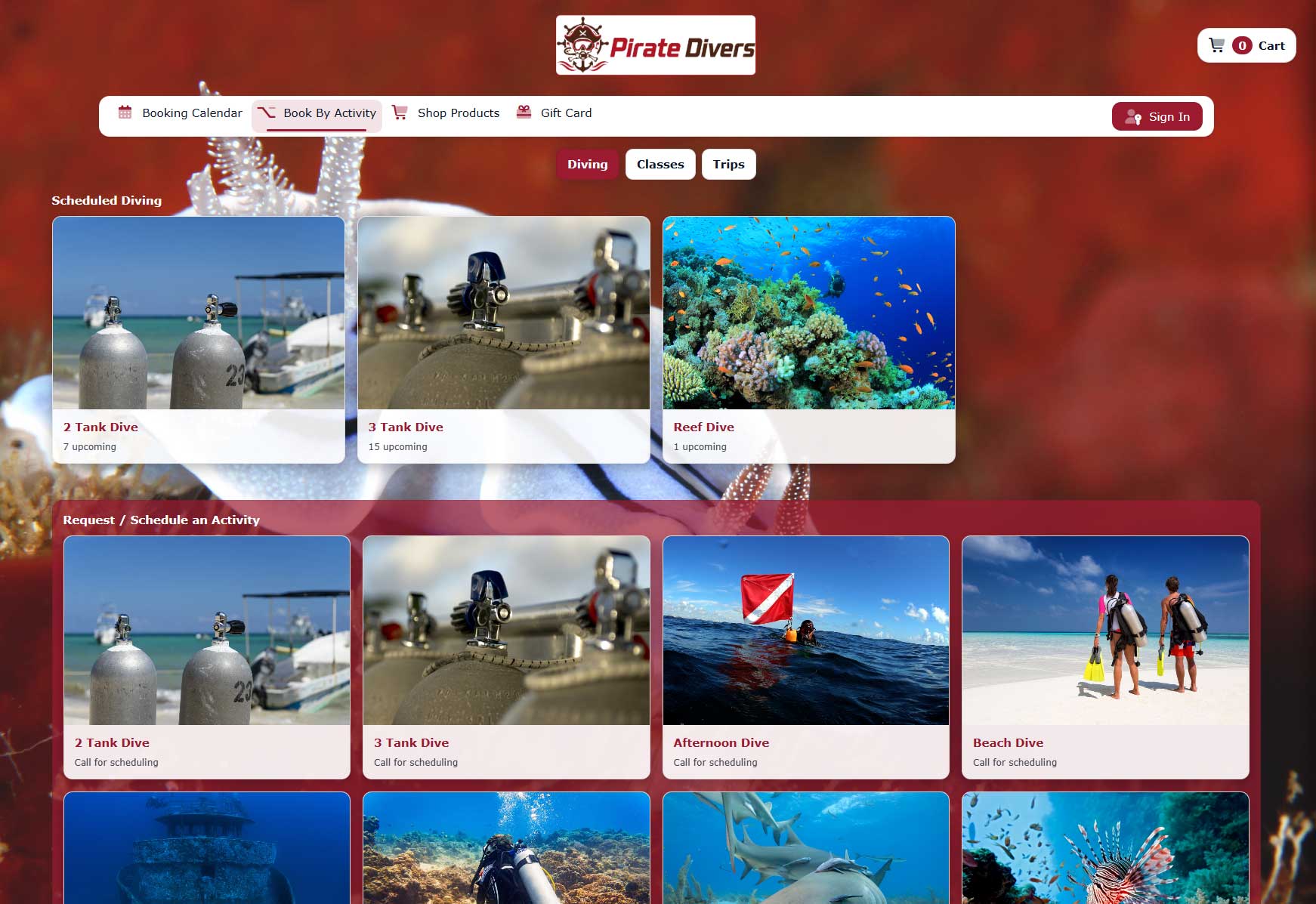
Online Activity and Class Booking
Give customers a public URL to view and book available activities, classes, trips, or charters. Link to your existing website for seamless booking.
- Expose customer-facing booking options while staff manage the internal schedule.
- Connect public booking activity back to customers, waivers, balances, and manifests.
- Reduce phone calls for routine availability checks.
Customize your booking experience
Build the customer-facing booking flow around how your shop sells activities.
Calendar Categories
Define your activity categories to make it a breeze for customers to find what they want to book.
- Group activities into clear customer-facing categories.
- Separate dive charters, beach dives, travel, training, and specialty events.
- Guide visitors into the right booking path before they pick a date.
Flexible Filters and Custom Color Legends
Help shoppers find the right experience quickly while giving staff visual calendar views that match the way your dive operation is organized.
- Let shoppers filter available activities by tank count, boat, calendar category, departure time, and difficulty level.
- Switch calendar color legends to highlight activities, classes and travel, boats, captains, departure times, tank counts, quick templates, or calendar categories.
- Choose custom background and text colors for clear, readable calendar cards and legends.
- Change the visual view without changing the underlying activity, booking, or roster information.
Quick Templates
Use reusable templates to create common trips, classes, charters, and recurring booking patterns without rebuilding every detail from scratch.
- Start from a proven setup for routine activities.
- Standardize capacity, timing, staff needs, pricing, and customer instructions.
- Reduce setup time for repeat schedules.
Define Activities
Define activities such as dive charters, beach dives, scheduled travel trips, and classes, then connect each activity to the right booking, waiver, manifest, and customer workflow.
- Control public names, internal details, capacity, and schedule rules.
- Support activities, classes, charters, travel, and shop-defined booking types.
- Keep the public booking path connected to staff operations.
Custom Theming
Theme the outside booking site so customers see a polished public experience that still connects directly to your internal operations.
- Match the public booking flow to your shop brand.
- Keep customer-facing pages clean and easy to scan.
- Use a branded public site without separating booking data from the system.
Dive Sites
Maintain dive site details that help customers and staff understand where activities happen and what each site requires.
- Organize sites for charters, local dives, training dives, and travel activities.
- Support site-specific planning and customer expectations.
- Keep dive site context close to activities and manifests.
Booking Options
Control booking choices, customer requirements, public availability, and the details customers need before checkout or confirmation.
- Set booking rules around capacity, dates, requirements, and customer information.
- Connect options to waivers, balances, memberships, and manifests.
- Make the online booking experience practical for both customers and staff.
Automated Customer Communication
Automate customer communication around bookings, classes, waivers, invoices, gift cards, reminders, and marketing follow-up.
- Use transactional and bulk email workflows through Mailjet integration.
- Send timely reminders for activities, balances, paperwork, and follow-up.
- Keep communication connected to customer records and operational activity.
Memberships and Dive Club Pricing
Support club memberships, student programs, staff groups, service plans, loyalty groups, and other recurring customer relationships.
- Create automatic discounts for students, military, staff, clubs, police, fire/rescue, or any customer group your business needs to support.
- Track membership status and group eligibility on the customer profile.
- Apply member pricing or program benefits without manual discounting.
- Use memberships for dive clubs, fill programs, training groups, and shop-defined plans.
AutoPay for Recurring Revenue
Create billing schedules for multiple trip deposits, class installments, service deposits, and final balances. Set weekly, monthly, quarterly, or annual recurring payments for ongoing arrangements, with billing that continues until canceled.
- Automate payments for dive club memberships, equipment rentals, gear storage, ongoing lessons, and maintenance or service plans.
- Keep payment activity connected to invoices, memberships, and customer history.
- Support flexible shop-defined billing workflows without a separate system.
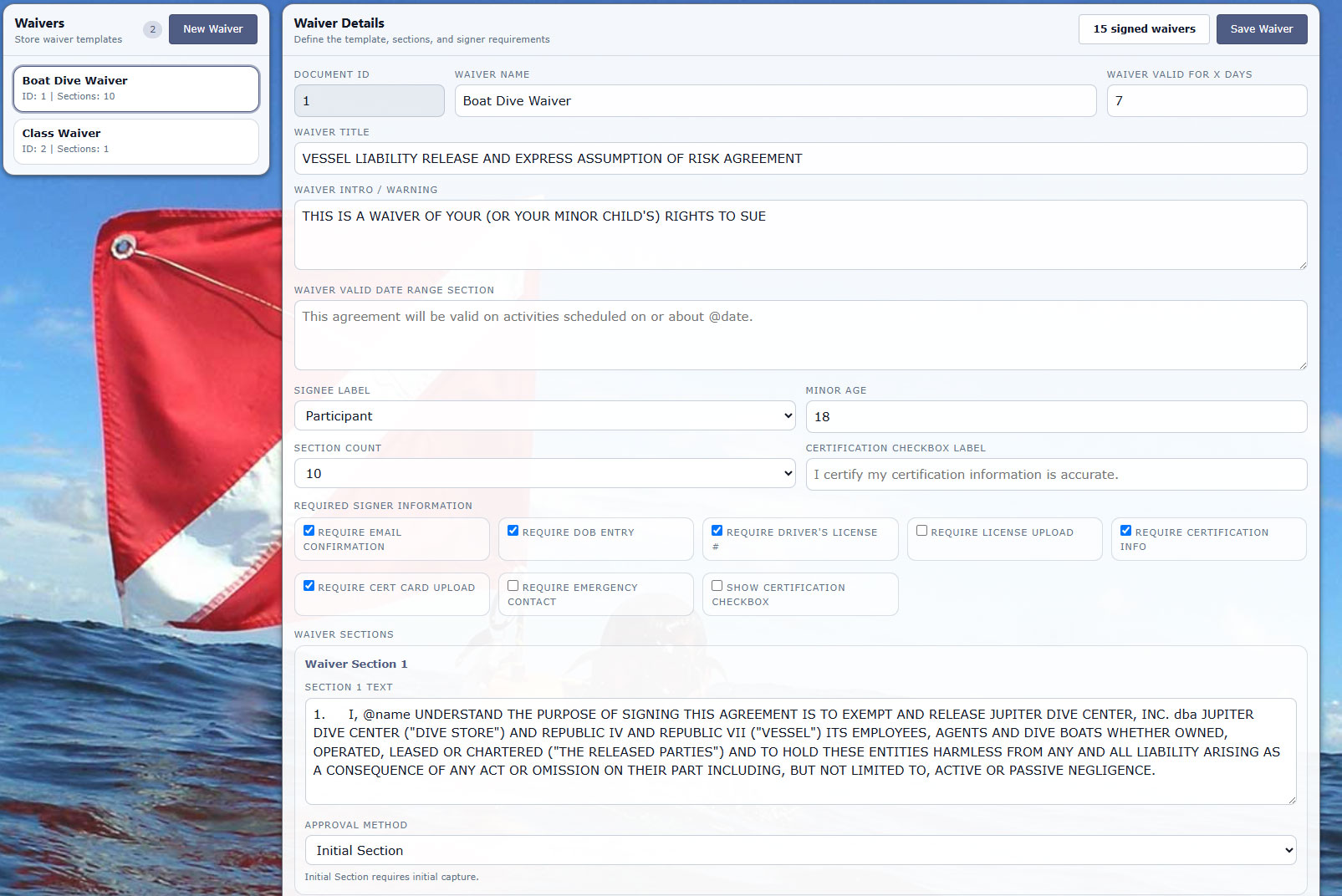
Digital Waivers and Guest Records
Capture flexible waivers for classes, activities, rentals, travel, minors, groups, and shop-defined risk workflows. Diverse Waivers, our built-in waiver system, is included with the Operations subscription at no additional cost.
- Use built-in dynamic waivers without a separate waiver subscription, or connect SmartWaiver when a third-party service is preferred.
- Attach waiver status to customers, bookings, rosters, and manifests.
- Support solo guests, families, group leaders, students, and non-diving participants.
See it with your workflows
Walk through a real dive day in Diverse Retail.
Bring your questions about bookings, rentals, training, service, or the retail counter.